
Childhood photos hold more than faces. They hold the color of a favorite shirt, the shape of a birthday cake, and the way light fell across a backyard. AI photo editing prompts give you a practical way to bring those details forward or reimagine them completely. This guide is built around childhood AI photo editing prompts. It includes 25 ready to use prompts organized by style, plus advice on adapting them and fixing weak results. You can use these prompts inside the beatmo app on your mobile device.
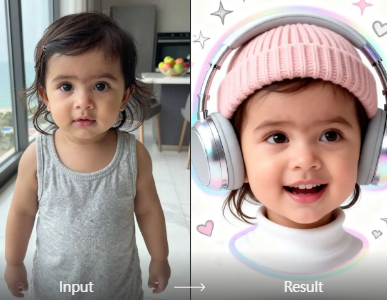
Why Childhood Photos Respond Well to AI Editing
Children's photos have strong visual elements. A small subject, soft clothing textures, expressive faces, and colorful toys give the AI clear material to work with. At the same time, old snapshots often have faded color, motion blur, or low resolution. AI editing can restore those details without losing the original mood. The prompts below focus on three things: preserving the child's identity, enhancing the scene, and adding a specific style that fits a childhood memory.
How to Use These Childhood AI Photo Editing Prompts
Open beatmo on your Android phone. Start with the image to image feature or the relevant style filter inside the app. Upload your childhood photo as a clear scan or phone photo of the print. Then use one of the prompts below as your direction. You can adjust the style intensity or add extra details such as the child's exact hair color, clothing, or background. The AI works best when the face is visible and the original image is not too heavily cropped.
25 Childhood AI Photo Editing Prompts
Nostalgic Film Looks
- Prompt: Edit this childhood photo to look like a faded 1990s family snapshot, soft grain, warm color cast, slightly overexposed background, genuine candid smile.
- Prompt: Restore this old childhood picture with a Kodachrome look, rich reds and greens, natural skin tones, crisp focus on the child's face, and a bright outdoor background.
- Prompt: Recreate this childhood moment as a soft Polaroid scan, white border, pastel color shifts, gentle vignette, and a relaxed summer afternoon feeling.
- Prompt: Edit this school portrait into a 1980s yearbook photo, neutral studio background, soft flash lighting, subtle grain, and the child's original shy expression.
- Prompt: Give this childhood photo a vintage sepia tone while keeping the eyes bright and the face clear, with a slight paper texture and an heirloom family album feel.
Storybook and Fairy Tale Scenes
- Prompt: Turn this childhood photo into a storybook illustration, watercolor textures, soft pastel meadow background, a small wooden fence, and the child holding a daisy.
- Prompt: Recreate this child as a gentle fairytale character in a forest clearing, dappled light, tiny glowing lights, mossy stones, and a soft blue coat.
- Prompt: Edit this childhood portrait into a cozy picture book scene, a window seat with a rainy window, a warm lamp, and the child reading a picture book.
- Prompt: Transform this old photo into a dreamy cloud scene, the child sitting on a fluffy cloud, soft blue sky, golden hour rim light, and a few floating paper boats.
- Prompt: Make this childhood moment look like a classic fairy tale, a child walking through a wildflower field at dusk, a tiny lantern in hand, and warm glowing fireflies.
Cartoon and Animated Styles
- Prompt: Turn this childhood photo into a 2D animated film still, clean outlines, flat colors, expressive eyes, and a playful backyard background.
- Prompt: Edit this child portrait into a Ghibli inspired scene, soft green hills, blue sky, wind moving through grass, and the child wearing a yellow raincoat.
- Prompt: Recreate this childhood picture as a 3D claymation character, rounded shapes, soft plastic texture, warm studio light, and a cheerful birthday party setting.
- Prompt: Turn this old childhood photo into a retro comic book panel, halftone shading, bold ink lines, bright primary colors, and a dynamic action pose.
- Prompt: Edit this child and pet photo into a cute animated style, big round eyes, soft fur texture, pastel background, and the child hugging the pet gently.
Vintage Restoration and Color Correction
- Prompt: Restore this faded childhood photo by removing scratches and dust, correcting washed out colors, sharpening the face, and keeping the original 1970s clothing colors.
- Prompt: Enhance this old black and white childhood photo, add realistic colorization for skin, hair, clothing, and background, but keep the vintage contrast and mood.
- Prompt: Repair this torn childhood snapshot, rebuild the missing corner, remove crease lines, and restore the child's full smile without changing the facial features.
- Prompt: Brighten this dark indoor childhood photo, recover shadow details on the face and cake, reduce yellow color cast, and add a soft natural window light.
- Prompt: Recolor this childhood birthday photo with accurate period clothing tones, warm candlelight, soft film grain, and a slightly muted background palette.
Seasonal and Playtime Scenes
- Prompt: Edit this childhood photo into a golden autumn scene, the child playing with fallen leaves, warm orange and red tones, soft backlight, and a cozy knit sweater.
- Prompt: Turn this summer childhood photo into a bright beach memory, turquoise water, sandy feet, a red bucket, and the child laughing under a wide sky.
- Prompt: Recreate this winter childhood moment with gentle falling snow, a red scarf, soft blue shadows, and the child catching snowflakes on a mitten.
- Prompt: Edit this backyard play photo into a late afternoon scene, the child on a swing, long shadows, warm golden light, and a slightly hazy summer atmosphere.
- Prompt: Turn this childhood sports photo into a dynamic action shot, clean grass field, motion blur on the background, bright jersey colors, and a determined expression.

How to Adapt These Prompts to Your Own Childhood Photos
Each prompt is a starting point. You can replace details such as clothing color, background, or season with what appears in your photo. For example, if your photo was taken in a driveway instead of a meadow, change the setting to a sunlit driveway with a bicycle. Keep the child's face recognizable by naming a few stable features in your prompt, such as dark curly hair or a gap toothed smile. The beatmo app lets you combine style filters with these prompts, so you can keep the original composition while changing only the atmosphere.
Common Weak Results and How to Fix Them
If the edited face looks different from the original, upload a sharper reference and reduce the style strength. If the background becomes too busy, add the words simple background and keep the child as the main subject. If the colors turn out too saturated, ask for muted tones or a faded film palette. If the child's expression looks unnatural, mention the original expression, such as a quiet smile or a surprised look. Small corrections to the prompt often make a large difference, so treat the first result as a draft rather than a final edit.
Editing Group Childhood Photos with Prompts
Group photos from birthdays, family trips, or school events need a slightly different approach. Use prompts that name each child by position, such as the child on the left in a blue shirt or the smallest child in the center. Ask for consistent lighting across all faces. For group scenes, prefer soft storybook or classic film styles over heavy cartoon distortion, because multiple faces can lose identity quickly. Example prompts include: restore this group childhood photo with warm natural light, keep each face distinct, and remove background clutter; edit this family photo into a golden hour picnic scene without changing any facial features; turn this school class photo into a gentle yearbook style with clean blue background and even lighting.
Final Tips for Childhood AI Photo Editing
Work with the best scan or photo you have. Avoid heavy digital filters before uploading because the AI needs clean detail. Keep prompts focused on one main style at a time. If you want a storybook look, do not also ask for harsh realistic lighting. Save your edited versions separately so you can compare. Most importantly, pick a style that matches the feeling of the memory. A soft film look often suits quiet moments, while a cartoon style works well for playful birthday scenes. These childhood AI photo editing prompts will give you a strong starting point for almost any old snapshot.