AI Deepthroat Generator
Recommended Beatmo AI Deepthroat Filter
Recommended Beatmo AI deepthroat filter for natural expressions, gentle motion, and romantic visual effects with smooth, engaging results.
Benefits of Using Beatmo for AI Deepthroat Effects
Beatmo helps add deepthroat effects with natural facial movement and scene interaction. You can select a filter, apply the effect, and adjust the result with simple steps.
 Before
Add Deepthroat Motion With Ease
The AI deepthroat generator helps you add deepthroat motion to a photo with a few simple steps. Beatmo uses the selected image and filter to shape the scene, while you can adjust the result and keep the focus on the people shown.
BeforeAdd Deepthroat Motion With Ease
The AI deepthroat generator helps you add deepthroat motion to a photo with a few simple steps. Beatmo uses the selected image and filter to shape the scene, while you can adjust the result and keep the focus on the people shown.
 Before
Find a Filter That Fits
With Beatmo, the AI deepthroat generator works with different filters for different visual directions. Choose a filter based on the scene you want, then apply it to your photo. You can try different options and see how each one changes the final result.
BeforeFind a Filter That Fits
With Beatmo, the AI deepthroat generator works with different filters for different visual directions. Choose a filter based on the scene you want, then apply it to your photo. You can try different options and see how each one changes the final result.
 Before
Give Photos More Movement
A still photo can become a short scene with the AI deepthroat generator. Beatmo adds movement around the subjects while keeping their main features in place. You can select a photo, choose a filter, and let the image develop into a deepthroat scene.
BeforeGive Photos More Movement
A still photo can become a short scene with the AI deepthroat generator. Beatmo adds movement around the subjects while keeping their main features in place. You can select a photo, choose a filter, and let the image develop into a deepthroat scene.
How to Use Beatmo to Create AI Deepthroat Effects?
Learn how to use Beatmo to create AI deepthroat effects with this step by step tutorial. Open the Beatmo app and start creating.

Step 01.
Download the Beatmo app, where you can start creating AI deepthroat effects anytime.
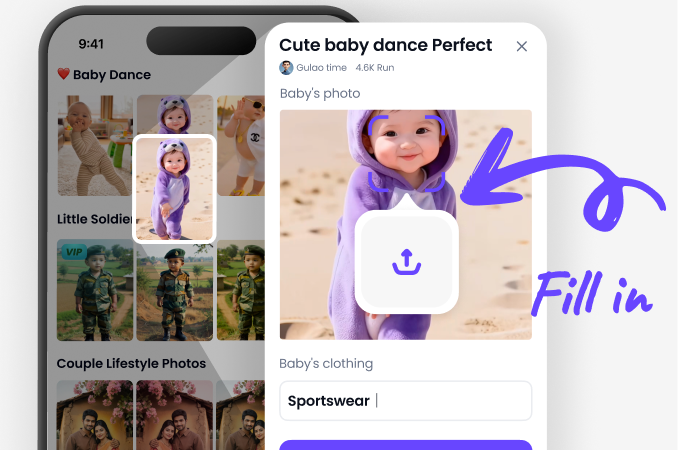
Step 02.
Select your preferred AI deepthroat effect filter in the app, then upload a photo to the selected filter.
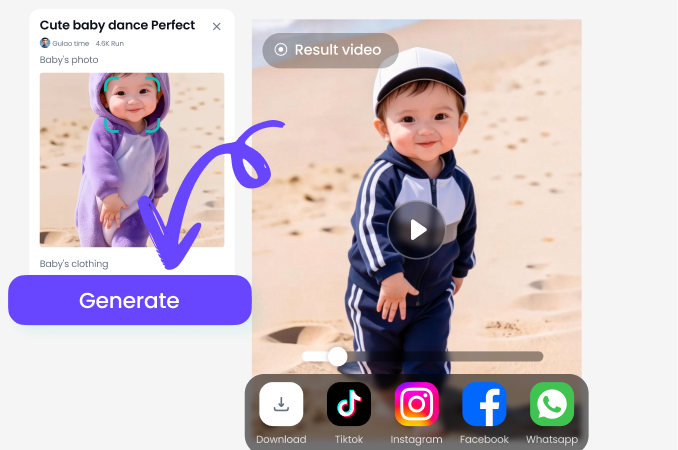
Step 03.
Click the button, and Beatmo will turn the photo into an AI deepthroat effect.
Examples of AI Deepthroat Effects Created with Beatmo
See how Beatmo applies AI deepthroat effects to photos, adding motion that changes the way couples appear together in each scene.
Make Every Deepthroat Scene Move
Use Beatmo to apply AI deepthroat effects to photos, adjust the scene with filters, and add motion that gives each moment a natural sense of interaction.

User Feedback on the Beatmo AI Deepthroat Filter
Casual Testing
I opened Beatmo to test the AI deepthroat generator with a photo from my gallery. After choosing a filter, I waited for the result and found the added interaction changed the mood of the original photo.
Trying Different Filters
I wanted to see how different filters would affect the same photo. Beatmo let me switch between options without a complicated workflow, and I could compare the AI deepthroat effects before deciding which result I preferred.
A New Take
I used a familiar photo for my first AI deepthroat effect and was curious about the outcome. Beatmo added movement to the scene while keeping the people recognizable, giving the image a different way to tell the moment.
Frequently Asked Questions
Find clear answers to common questions and get the guidance you need to make the most of our platform, faster and easier.
More Topics You May Like
Explore more topics you may like and discover fresh ideas tailored to your interests.
Beatmo Nude Runway Models Filter for Fashion Style
Pinay Nude Videos With Natural AI Motion | Beatmo
Beatmo Head Swap Porn Filters: Create Fresh Looks with Head Swap Porn Effects

AI Nude Online Free Tool for Easy Visual Creation | Beatmo
Bikini App for Porn Photo Editing with Beatmo
Beatmo Nude Runway Models Filter for Fashion Style
Pinay Nude Videos With Natural AI Motion | Beatmo
Beatmo Head Swap Porn Filters: Create Fresh Looks with Head Swap Porn Effects
AI Nude Online Free Tool for Easy Visual Creation | Beatmo
Bikini App for Porn Photo Editing with Beatmo
Give Your Photos a New Deepthroat Effect
Download Beatmo and use the AI deepthroat generator on your phone. Pick a photo, select a filter, and add movement to your scene with a few simple steps.
Give Your Photos a New Deepthroat Effect
Download Beatmo and use the AI deepthroat generator on your phone. Pick a photo, select a filter, and add movement to your scene with a few simple steps.