AI Lying Down Video Generator

Choose Your Favorite AI Lying Down Video Filter
Find a filter that suits your scene and shapes natural lying poses into smooth, engaging video moments.
Advantages of Using Beatmo to Make Lying Down Videos
Beatmo helps your lying down videos feel more natural by keeping body movement connected and maintaining the subject's appearance throughout.
 Before
Shape Relaxed Lying Scenes
Beatmo gives the AI lying down video generator a natural sense of movement by letting the subject settle into a relaxed position within the frame. The video can show gradual shifts in the body, gentle head movement, or a change in where the subject looks. These details make the footage feel less static while keeping the original scene recognizable.
BeforeShape Relaxed Lying Scenes
Beatmo gives the AI lying down video generator a natural sense of movement by letting the subject settle into a relaxed position within the frame. The video can show gradual shifts in the body, gentle head movement, or a change in where the subject looks. These details make the footage feel less static while keeping the original scene recognizable.
 Before
Set the Mood Through Filters
The AI lying down video generator in Beatmo supports different visual directions through its wide selection of filters. A quiet bedroom, outdoor setting, or casual portrait can take on a different feeling depending on the chosen look. Changes in lighting, color treatment, and overall atmosphere can help your footage match the idea you have in mind.
BeforeSet the Mood Through Filters
The AI lying down video generator in Beatmo supports different visual directions through its wide selection of filters. A quiet bedroom, outdoor setting, or casual portrait can take on a different feeling depending on the chosen look. Changes in lighting, color treatment, and overall atmosphere can help your footage match the idea you have in mind.
 Before
Keep the Person Easy to Recognize
When you use Beatmo for AI lying down video generator effects, the person remains the main focus of the scene. Facial features and overall appearance stay recognizable as the footage develops. This makes the result work well for photos where you want the original person to remain visually familiar while adding a more lifelike moment to the image.
BeforeKeep the Person Easy to Recognize
When you use Beatmo for AI lying down video generator effects, the person remains the main focus of the scene. Facial features and overall appearance stay recognizable as the footage develops. This makes the result work well for photos where you want the original person to remain visually familiar while adding a more lifelike moment to the image.
How to Use Beatmo to Make AI Lying Down Videos?
Learn how to make AI lying down videos with Beatmo through this simple guide. Download the Beatmo app and give it a try.

Step 01.
Download the Beatmo app and make AI lying down videos anytime, wherever you are.
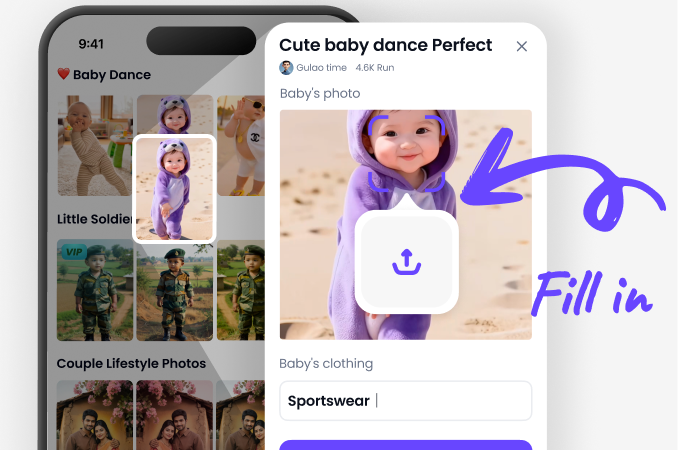
Step 02.
Choose your favorite AI lying down video filter in the app, then upload a photo to use with the filter.
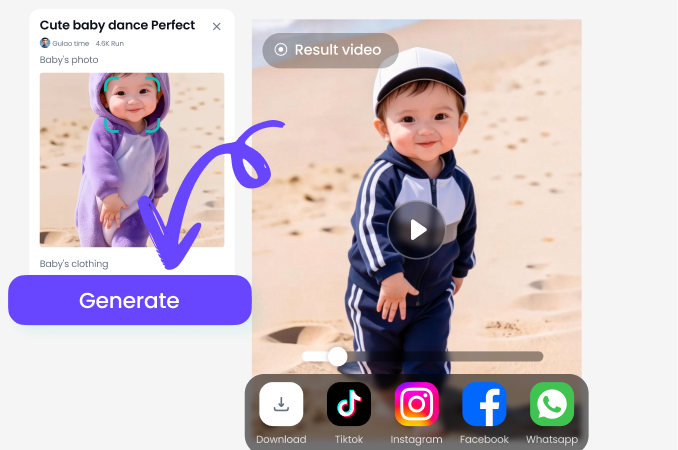
Step 03.
Tap the Generate button, and Beatmo will turn your photo into an AI lying down video.

Try Creating an AI Lying Down Video Now
Beatmo makes AI lying down video generator effects easier to enjoy with a wide range of filters and simple creation. Your photos can gain natural movement while the main subject stays recognizable, helping each result feel connected to the original image and suited to different creative ideas.
AI Lying Down Videos Made with Beatmo
See how AI lying down videos made with Beatmo add natural motion and fresh visual expression to still images.
Let Your Lying Down Scenes Move Naturally
Give your lying down photos a natural sense of movement with Beatmo, while filters help shape the scene and keep the original subject recognizable.

Frequently Asked Questions
Find clear answers to common questions and get the guidance you need to make the most of our platform, faster and easier.
More Topics You May Like
Explore more topics you may like and discover fresh ideas tailored to your interests.

Beatmo Nude Runway Models Filter for Fashion Style

Pinay Nude Videos With Natural AI Motion | Beatmo
Beatmo Head Swap Porn Filters: Create Fresh Looks with Head Swap Porn Effects

AI Nude Online Free Tool for Easy Visual Creation | Beatmo
Bikini App for Porn Photo Editing with Beatmo
Beatmo Nude Runway Models Filter for Fashion Style
Pinay Nude Videos With Natural AI Motion | Beatmo
Beatmo Head Swap Porn Filters: Create Fresh Looks with Head Swap Porn Effects
AI Nude Online Free Tool for Easy Visual Creation | Beatmo
Bikini App for Porn Photo Editing with Beatmo
Make Your Lying Down Photos Come Alive with Motion
Download the Beatmo app to try AI lying down video generator effects, apply your favorite filters, and add natural motion to your photos.
Make Your Lying Down Photos Come Alive with Motion
Download the Beatmo app to try AI lying down video generator effects, apply your favorite filters, and add natural motion to your photos.