AI Squat Twist
Try The AI Squat Twist Filter
Try the AI squat twist filter on Beatmo and add a natural squat motion to your video.
Advantages of Using Beatmo to Create AI Squat Twist Videos
Beatmo adds natural squat movement to videos while keeping the subject recognizable and the motion easy to follow.
 Before
 After
Natural Squat Motion
AI squat twist adds a squat sequence to your footage while keeping the main subject easy to recognize. Beatmo helps shape the movement around the original scene, so you can enjoy a workout effect that follows the body without making the video feel forced.
BeforeAfterNatural Squat Motion
AI squat twist adds a squat sequence to your footage while keeping the main subject easy to recognize. Beatmo helps shape the movement around the original scene, so you can enjoy a workout effect that follows the body without making the video feel forced.
 Before
Filters for Different Styles
With a range of filters, AI squat twists can fit different visual themes and scenes. You can find a style that matches your footage, while Beatmo keeps the squat action connected to the original image for a more natural viewing experience.
BeforeFilters for Different Styles
With a range of filters, AI squat twists can fit different visual themes and scenes. You can find a style that matches your footage, while Beatmo keeps the squat action connected to the original image for a more natural viewing experience.
 Before
 After
Motion That Feels Connected
Smooth body movement gives AI squat twist videos a sense of continuity from one frame to the next. Beatmo keeps attention to the subject as the squat action unfolds, making the effect easy to watch and suitable for short form social content.
BeforeAfterMotion That Feels Connected
Smooth body movement gives AI squat twist videos a sense of continuity from one frame to the next. Beatmo keeps attention to the subject as the squat action unfolds, making the effect easy to watch and suitable for short form social content.
How to Use Beatmo to Create AI Squat Twist Videos?
Learn how to create AI squat twist videos with Beatmo by following the step by step tutorial. Download the Beatmo app and give it a try yourself.

Step 01.
Download the Beatmo app and start creating AI squat twist videos anytime.
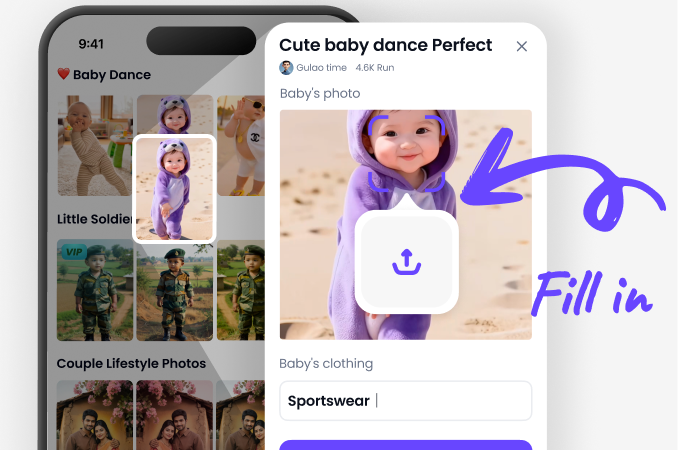
Step 02.
In the app, choose your favorite AI squat twist video filter and upload a photo to use for the generation.
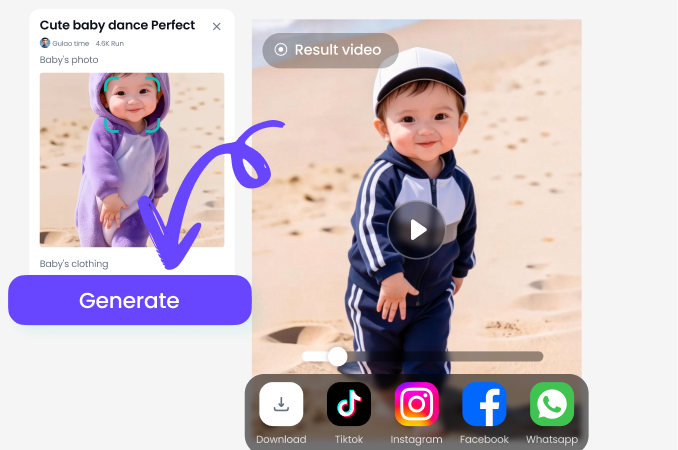
Step 03.
Tap the button, and Beatmo will turn your photo into an AI squat twist video.
AI Squat Twist Videos Created With Beatmo
Beatmo gives AI squat twist videos a natural rhythm, with the subject moving through each squat while staying clear.


Try the AI Squat Twist Effect With Beatmo
See your photos taken on squat motion with Beatmo. The AI squat twist effect adds movement to each scene while keeping the subject easy to recognize.

User Feedback on the AI Squat Twist Filter
My First Test
I tried AI squat twist with a photo I had saved on my phone. The movement appeared smoothly, and the person in the image remained easy to recognize. I enjoyed seeing a still picture take on a different rhythm.
Watching the Motion
I tested Beatmo with a full body photo and was curious about how the squat effect would look. The result kept the main pose visible while adding movement that made the clip feel more active.
A Different Take
I used AI squat twists on an everyday photo and liked the change from a still image to moving footage. Beatmo kept the focus on the person, while the squat sequence gave the scene a new direction.
Frequently Asked Questions
Find clear answers to common questions and get the guidance you need to make the most of our platform, faster and easier.
More Topics You May Like
Explore more topics you may like and discover fresh ideas tailored to your interests.
Beatmo Nude Runway Models Filter for Fashion Style
Pinay Nude Videos With Natural AI Motion | Beatmo
Beatmo Head Swap Porn Filters: Create Fresh Looks with Head Swap Porn Effects

AI Nude Online Free Tool for Easy Visual Creation | Beatmo
Bikini App for Porn Photo Editing with Beatmo
Beatmo Nude Runway Models Filter for Fashion Style
Pinay Nude Videos With Natural AI Motion | Beatmo
Beatmo Head Swap Porn Filters: Create Fresh Looks with Head Swap Porn Effects
AI Nude Online Free Tool for Easy Visual Creation | Beatmo
Bikini App for Porn Photo Editing with Beatmo
Give Your Photos a New Move With AI Squat Twist
Download the Beatmo app and enjoy AI squat twists with flexible filters, smooth motion effects, and more creative video options right from your phone.
Give Your Photos a New Move With AI Squat Twist
Download the Beatmo app and enjoy AI squat twists with flexible filters, smooth motion effects, and more creative video options right from your phone.